> ## Documentation Index
> Fetch the complete documentation index at: https://docs.pnta.io/llms.txt
> Use this file to discover all available pages before exploring further.
# Supabase
> Trigger push notifications directly from your Supabase database using PNTA
## Prerequisites
* Supabase project
* PNTA account with project ID (`prj_XXXXXXXXX`)
* Platform keys configured in [PNTA Dashboard](https://app.pnta.io) (see [Platform Keys Setup](/resources/platform-keys))
* Devices registered via a PNTA client SDK, with relevant identifiers stored in device metadata (e.g. `user_id`)
## Setup Steps
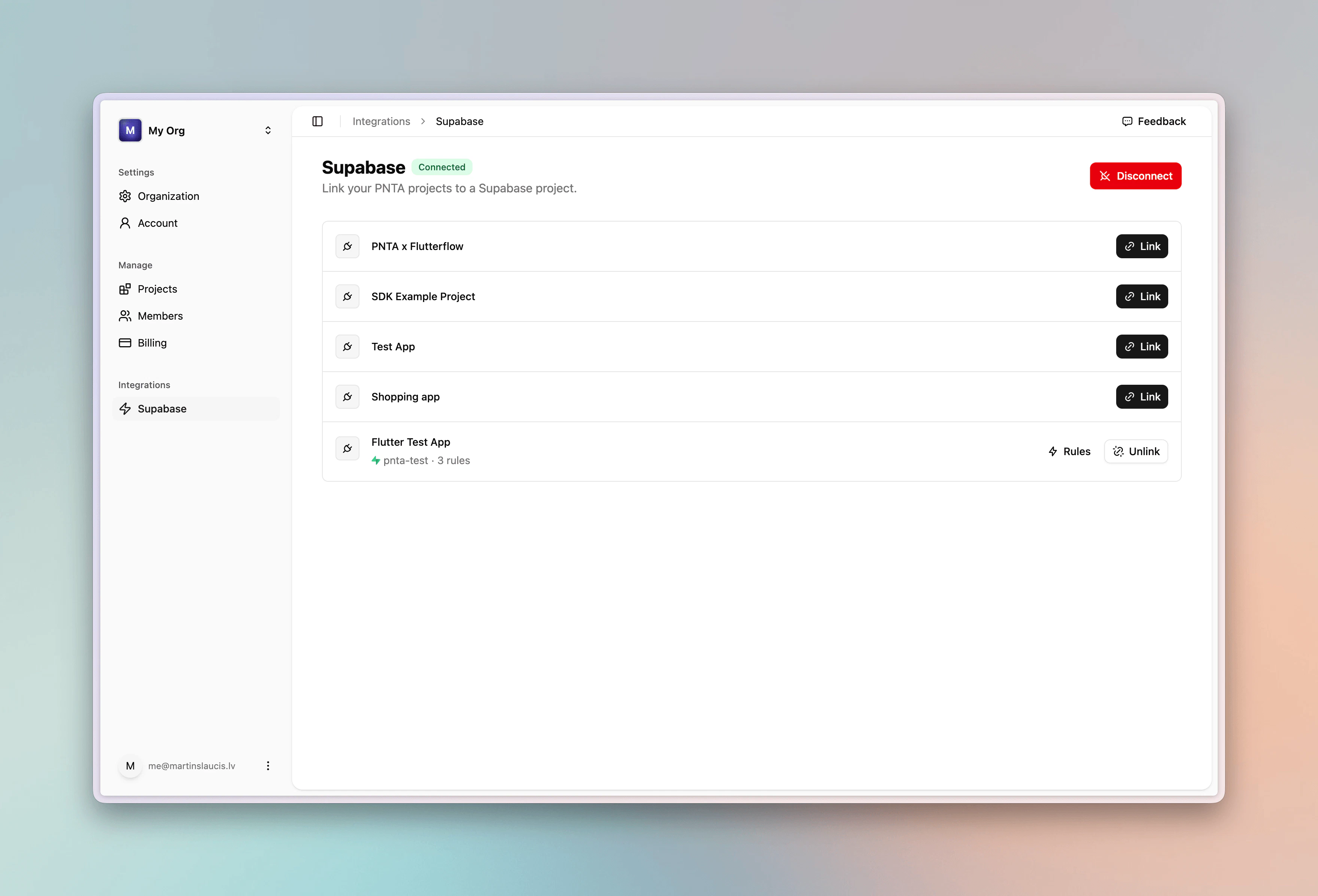
### 1. Connect Your Supabase Project
1. In the [PNTA Dashboard](https://app.pnta.io) sidebar, open the **Integrations** section and click **Supabase**
2. Click **Connect**
3. Authorize PNTA via OAuth
4. Link a Supabase project to your PNTA project
5. Go to **Rules**
PNTA uses OAuth to connect to your Supabase project. No manual database
configuration or SQL is required. Everything is set up automatically.
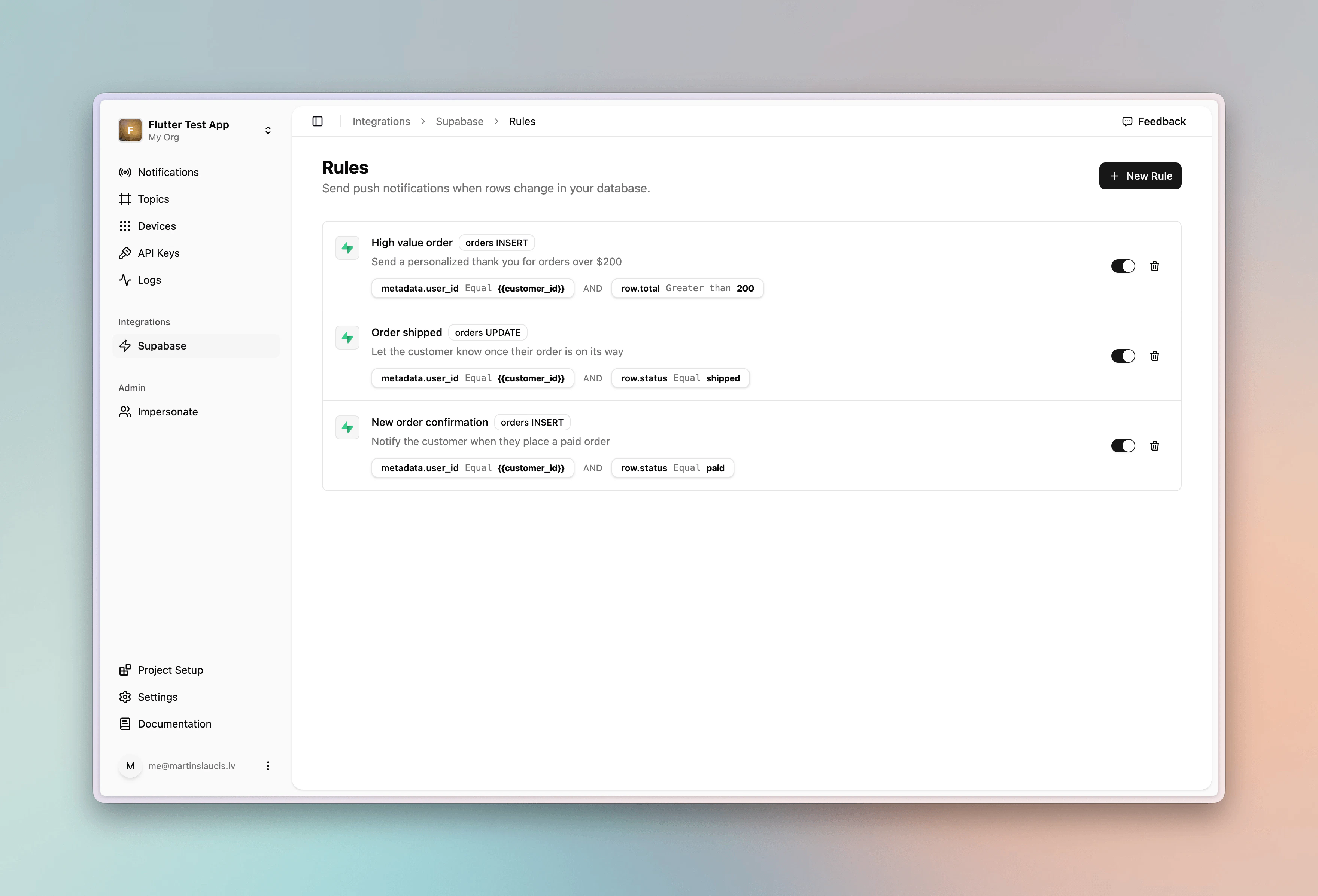
 ### 2. Create a Notification Rule
From **Rules**, click **New Rule**.
### 2. Create a Notification Rule
From **Rules**, click **New Rule**.
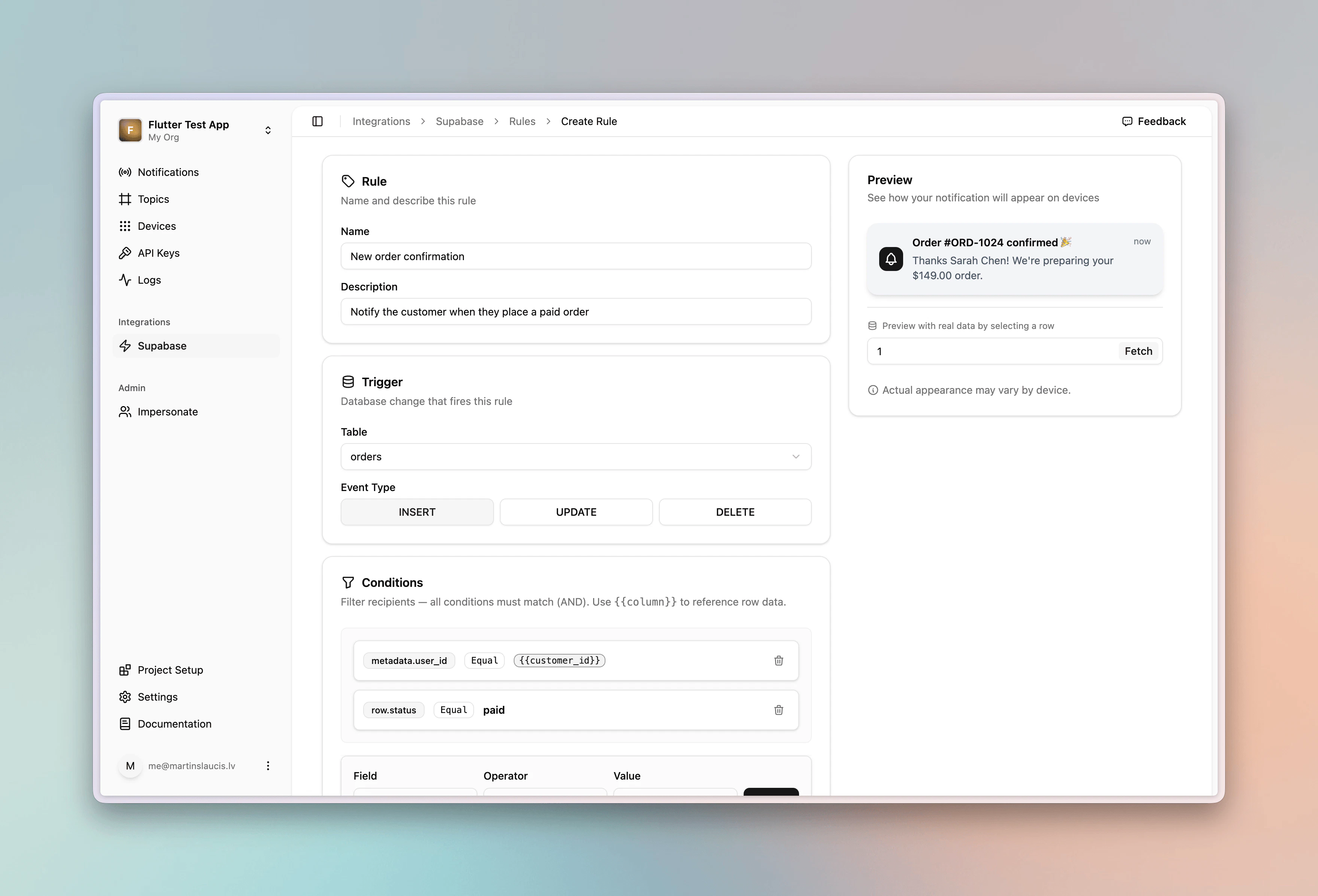
 We'll walk through an order confirmation push using this `orders` table as the example:
```sql theme={null}
create table orders (
id uuid primary key default gen_random_uuid(),
order_number text not null unique,
customer_id text not null,
customer_name text not null,
customer_email text not null,
total numeric(10, 2) not null,
currency text not null default 'USD',
status text not null default 'pending',
carrier text,
shipped_at timestamptz,
created_at timestamptz not null default now()
);
```
Give the rule a description so you can identify it later:
* **Description**: `Notify the customer when they place a paid order`
Then set the trigger, which is the table and event that fire the rule:
* **Table**: `orders`
* **Event**: `insert`
### 3. Add Conditions
Conditions decide **who** receives the push and **when** it fires. Each rule typically combines:
* A **device filter** (`metadata.*` or `identifiers.*`) that routes to the right devices
* A **row filter** (`row.*`) that gates the rule on row values
When a row changes, PNTA matches a column from that row against a field in each registered device's metadata. Only matching devices receive the push, so your client SDK must register devices with the matching field (in this case, `user_id` set to the customer's ID).
For the order confirmation rule:
* `metadata.user_id` `is_equal` `{{customer_id}}` targets only the customer's devices
* `row.status` `is_equal` `paid` ensures the rule only fires once the order is paid
We'll walk through an order confirmation push using this `orders` table as the example:
```sql theme={null}
create table orders (
id uuid primary key default gen_random_uuid(),
order_number text not null unique,
customer_id text not null,
customer_name text not null,
customer_email text not null,
total numeric(10, 2) not null,
currency text not null default 'USD',
status text not null default 'pending',
carrier text,
shipped_at timestamptz,
created_at timestamptz not null default now()
);
```
Give the rule a description so you can identify it later:
* **Description**: `Notify the customer when they place a paid order`
Then set the trigger, which is the table and event that fire the rule:
* **Table**: `orders`
* **Event**: `insert`
### 3. Add Conditions
Conditions decide **who** receives the push and **when** it fires. Each rule typically combines:
* A **device filter** (`metadata.*` or `identifiers.*`) that routes to the right devices
* A **row filter** (`row.*`) that gates the rule on row values
When a row changes, PNTA matches a column from that row against a field in each registered device's metadata. Only matching devices receive the push, so your client SDK must register devices with the matching field (in this case, `user_id` set to the customer's ID).
For the order confirmation rule:
* `metadata.user_id` `is_equal` `{{customer_id}}` targets only the customer's devices
* `row.status` `is_equal` `paid` ensures the rule only fires once the order is paid
 ### 4. Configure the Template
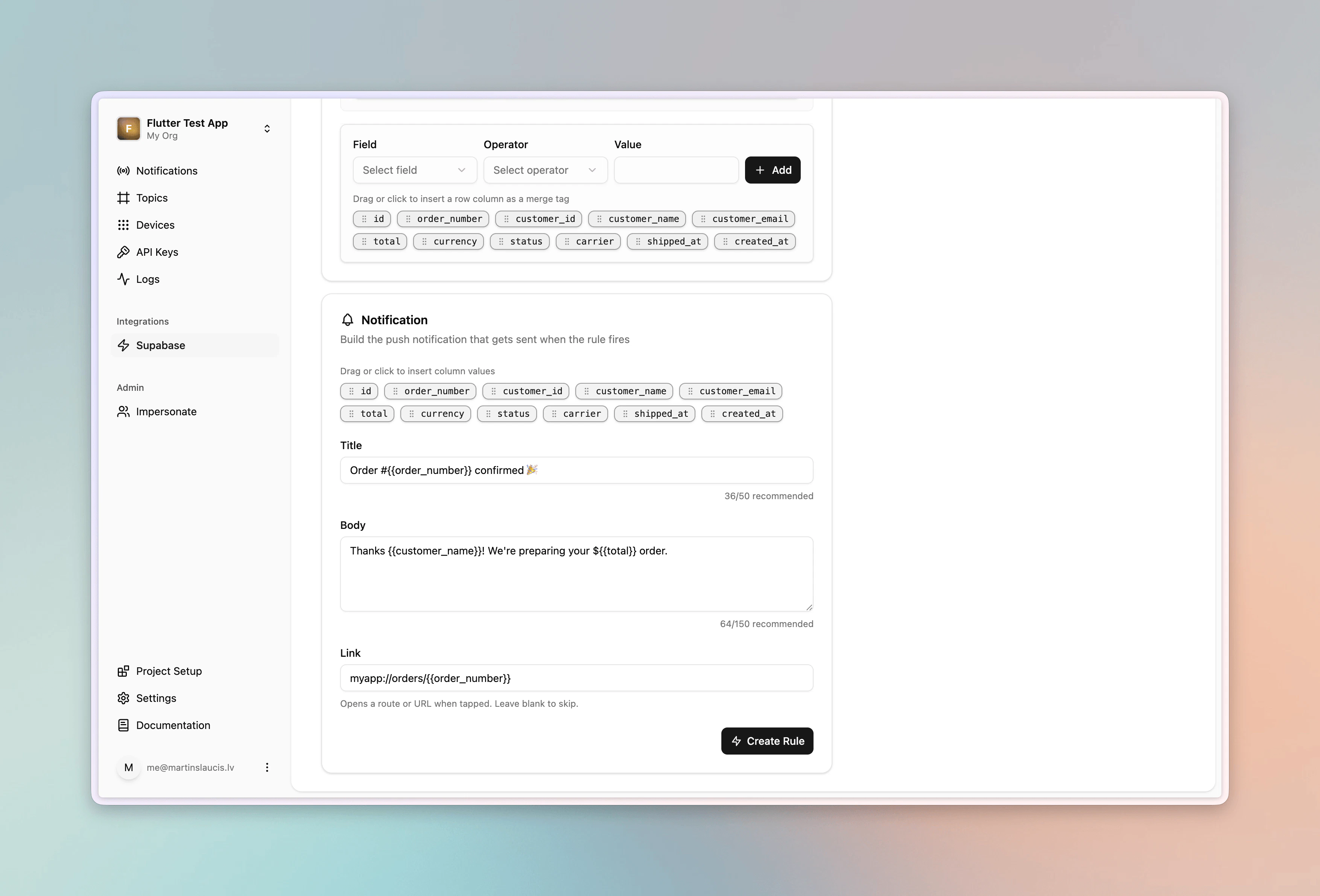
Use `{{column_name}}` placeholders to pull values from the row directly into the notification:
* **Title**: `Order #{{order_number}} confirmed 🎉`
* **Body**: `Thanks {{customer_name}}! We're preparing your ${{total}} order.`
* **Link**: `myapp://orders/{{order_number}}`
Any column in the row is available as a placeholder.
The preview panel on the right lets you enter an existing row ID and see exactly what the notification will look like with real values filled in, so you can sanity-check your template before saving.
### 4. Configure the Template
Use `{{column_name}}` placeholders to pull values from the row directly into the notification:
* **Title**: `Order #{{order_number}} confirmed 🎉`
* **Body**: `Thanks {{customer_name}}! We're preparing your ${{total}} order.`
* **Link**: `myapp://orders/{{order_number}}`
Any column in the row is available as a placeholder.
The preview panel on the right lets you enter an existing row ID and see exactly what the notification will look like with real values filled in, so you can sanity-check your template before saving.
 Save the rule and it's live.
### 5. Test It
Paste this into the Supabase SQL editor to trigger the rule:
```sql theme={null}
insert into orders (order_number, customer_id, customer_name, customer_email, total, status)
values ('1001', 'user_123', 'Alex', 'alex@example.com', 49.00, 'paid');
```
Then open the **Notifications** dashboard in PNTA. Every notification PNTA sends shows up there, so you'll find the new one at the top along with the devices it was sent to. Any device registered with `user_id = "user_123"` in its metadata receives the push.
## Use Cases
Orders is just one example. The same primitives (`insert`/`update`/`delete` triggers, row placeholders, metadata routing, and row conditions) work against any table you have. Chat messages, comments, friend requests, booking confirmations, low-stock alerts, content moderation flags, and anything else you store in Supabase can drive a push.
Two more rules built against the same `orders` table to show the range:
**Order shipped** fires on `update` when the status flips to `shipped`:
* **Trigger**: `orders` / `update`
* **Title**: `Your order is on its way! 📦`
* **Body**: `Order #{{order_number}} shipped via {{carrier}}`
* **Conditions**: `metadata.user_id` `is_equal` `{{customer_id}}` + `row.status` `is_equal` `shipped`
**High value order** fires on `insert` when the total exceeds \$200:
* **Trigger**: `orders` / `insert`
* **Title**: `Thank you for your order, {{customer_name}}!`
* **Body**: `Your ${{total}} order #{{order_number}} is being prepared with care`
* **Conditions**: `metadata.user_id` `is_equal` `{{customer_id}}` + `row.total` `greater_than` `200`
### Realtime chat
Chat is just another table. Say you store messages like this:
```sql theme={null}
create table messages (
id uuid primary key default gen_random_uuid(),
conversation_id uuid not null,
sender_id text not null,
sender_name text not null,
recipient_id text not null,
body text not null,
created_at timestamptz not null default now()
);
```
Add an `insert` rule that notifies the recipient whenever a new message lands:
* **Trigger**: `messages` / `insert`
* **Title**: `{{sender_name}}`
* **Body**: `{{body}}`
* **Link**: `myapp://conversations/{{conversation_id}}`
* **Conditions**: `metadata.user_id` `is_equal` `{{recipient_id}}`
PNTA fires on the insert via Supabase Database Webhooks, independent of
Supabase Realtime. It works whether or not Realtime is enabled, and the two
run side by side.
## Troubleshooting
**No notification fires.** Confirm that at least one device is registered with the matching field in its metadata (for this example, `user_id` set to the row's `customer_id`). Without a metadata match, PNTA has no devices to deliver to.
**Rule won't save.** Every rule must include at least one device filter, either a `metadata.*` or an `identifiers.*` condition. PNTA uses it to match the incoming row to specific devices, so without it there's no way to determine who should receive the push and the rule can't be saved.
## Resources
Learn more about Supabase
Save the rule and it's live.
### 5. Test It
Paste this into the Supabase SQL editor to trigger the rule:
```sql theme={null}
insert into orders (order_number, customer_id, customer_name, customer_email, total, status)
values ('1001', 'user_123', 'Alex', 'alex@example.com', 49.00, 'paid');
```
Then open the **Notifications** dashboard in PNTA. Every notification PNTA sends shows up there, so you'll find the new one at the top along with the devices it was sent to. Any device registered with `user_id = "user_123"` in its metadata receives the push.
## Use Cases
Orders is just one example. The same primitives (`insert`/`update`/`delete` triggers, row placeholders, metadata routing, and row conditions) work against any table you have. Chat messages, comments, friend requests, booking confirmations, low-stock alerts, content moderation flags, and anything else you store in Supabase can drive a push.
Two more rules built against the same `orders` table to show the range:
**Order shipped** fires on `update` when the status flips to `shipped`:
* **Trigger**: `orders` / `update`
* **Title**: `Your order is on its way! 📦`
* **Body**: `Order #{{order_number}} shipped via {{carrier}}`
* **Conditions**: `metadata.user_id` `is_equal` `{{customer_id}}` + `row.status` `is_equal` `shipped`
**High value order** fires on `insert` when the total exceeds \$200:
* **Trigger**: `orders` / `insert`
* **Title**: `Thank you for your order, {{customer_name}}!`
* **Body**: `Your ${{total}} order #{{order_number}} is being prepared with care`
* **Conditions**: `metadata.user_id` `is_equal` `{{customer_id}}` + `row.total` `greater_than` `200`
### Realtime chat
Chat is just another table. Say you store messages like this:
```sql theme={null}
create table messages (
id uuid primary key default gen_random_uuid(),
conversation_id uuid not null,
sender_id text not null,
sender_name text not null,
recipient_id text not null,
body text not null,
created_at timestamptz not null default now()
);
```
Add an `insert` rule that notifies the recipient whenever a new message lands:
* **Trigger**: `messages` / `insert`
* **Title**: `{{sender_name}}`
* **Body**: `{{body}}`
* **Link**: `myapp://conversations/{{conversation_id}}`
* **Conditions**: `metadata.user_id` `is_equal` `{{recipient_id}}`
PNTA fires on the insert via Supabase Database Webhooks, independent of
Supabase Realtime. It works whether or not Realtime is enabled, and the two
run side by side.
## Troubleshooting
**No notification fires.** Confirm that at least one device is registered with the matching field in its metadata (for this example, `user_id` set to the row's `customer_id`). Without a metadata match, PNTA has no devices to deliver to.
**Rule won't save.** Every rule must include at least one device filter, either a `metadata.*` or an `identifiers.*` condition. PNTA uses it to match the incoming row to specific devices, so without it there's no way to determine who should receive the push and the rule can't be saved.
## Resources
Learn more about Supabase