> ## Documentation Index
> Fetch the complete documentation index at: https://docs.pnta.io/llms.txt
> Use this file to discover all available pages before exploring further.
# n8n
> Set up push notifications in your n8n workflows using PNTA
## Prerequisites
* n8n instance (self-hosted or cloud)
* PNTA account with project ID (`prj_XXXXXXXXX`)
* API key created in [PNTA Dashboard](https://app.pnta.io)
* Platform keys configured in [PNTA Dashboard](https://app.pnta.io) (see [Platform Keys Setup](/resources/platform-keys))
## Setup Steps
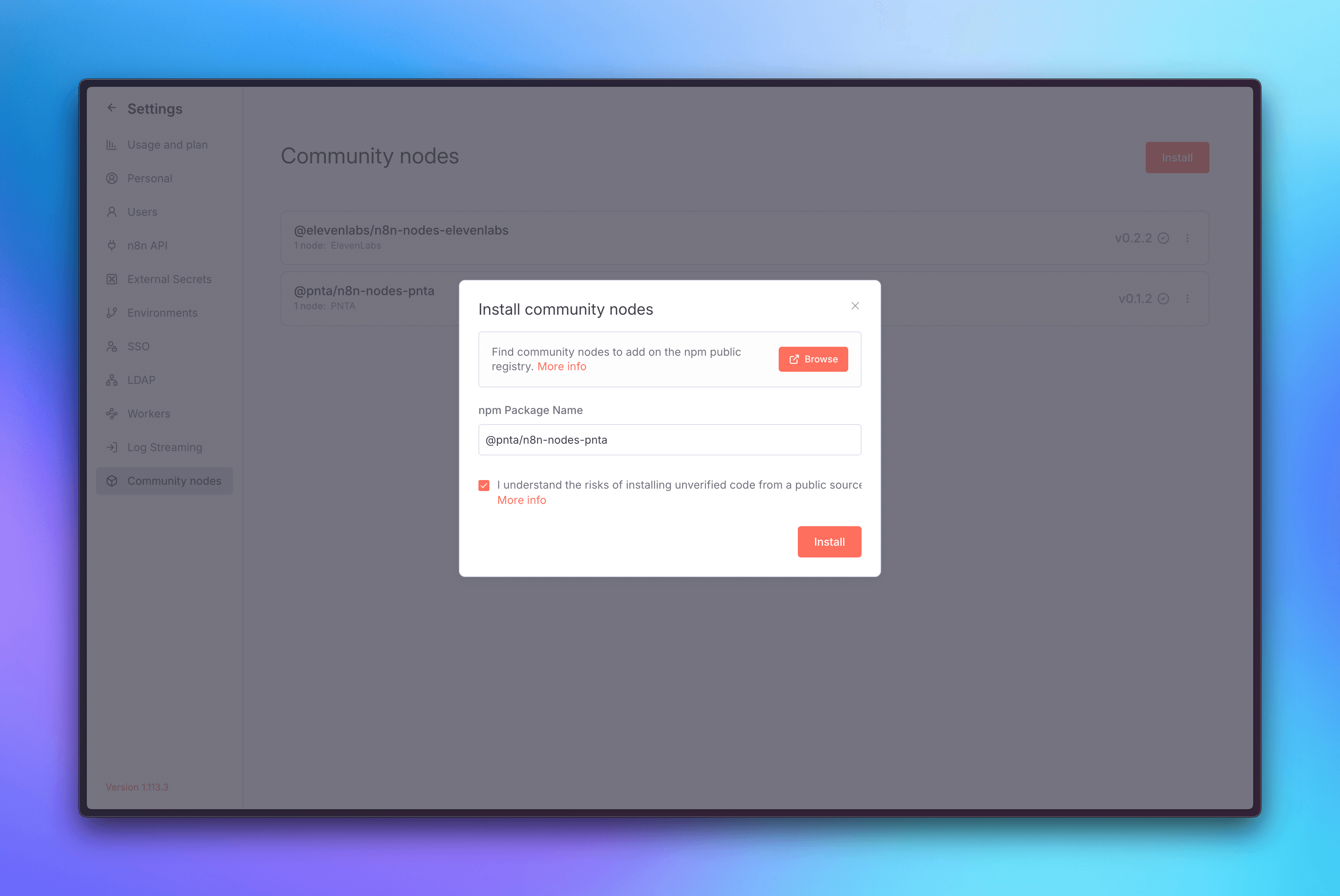
### 1. Install PNTA Node
1. Go to **Settings** → **Community nodes**
2. Click **Install**
3. Enter `@pnta/n8n-nodes-pnta` as the package name
4. Click **Install** to add the PNTA node to your n8n instance
 ### 2. Configure Authentication
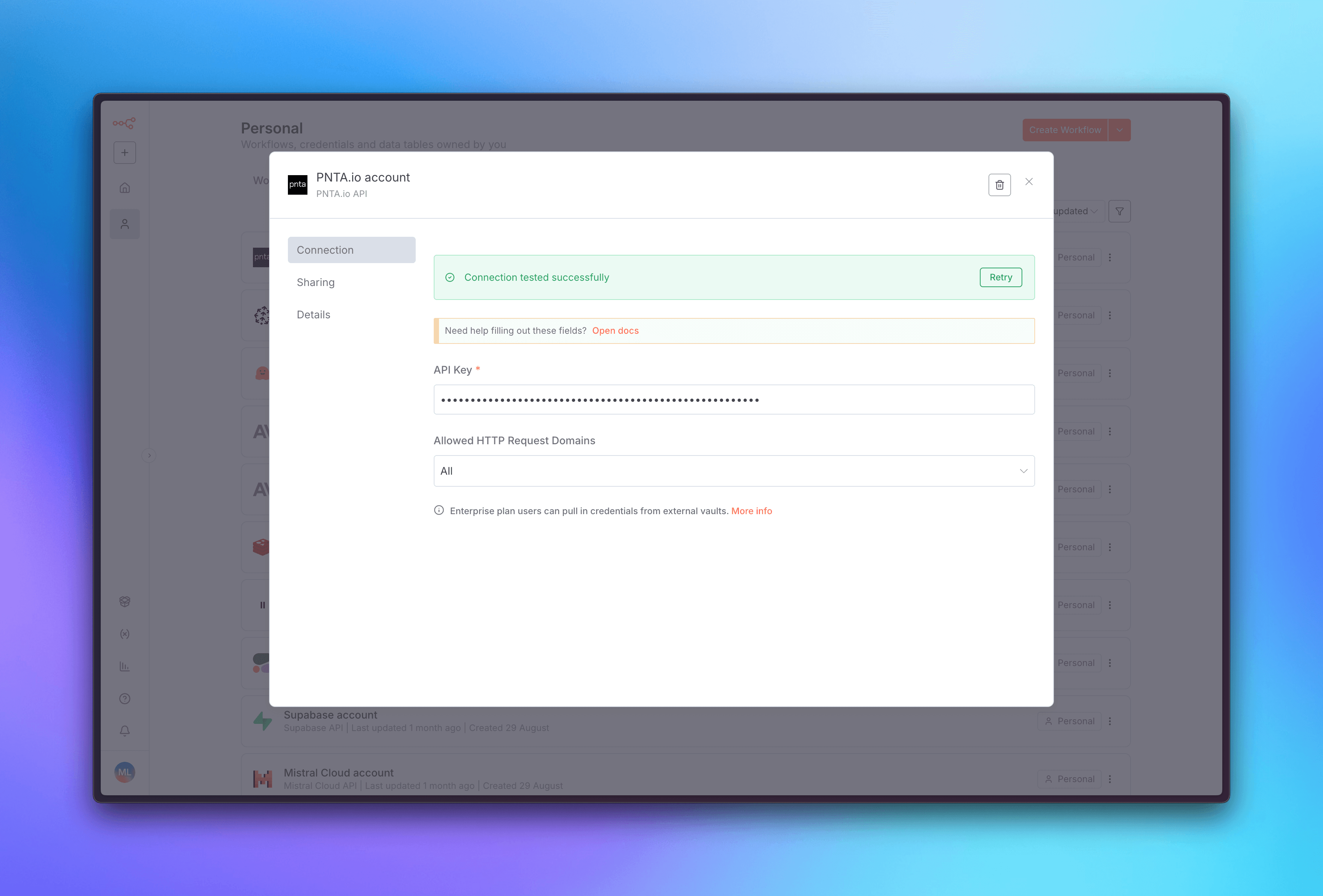
1. Go back to your n8n dashboard
2. Click on **Create credential** in the top right corner
3. Search for **PNTA** and select it
4. Add the API key you created for your project in the PNTA Dashboard
5. Save the credential
### 2. Configure Authentication
1. Go back to your n8n dashboard
2. Click on **Create credential** in the top right corner
3. Search for **PNTA** and select it
4. Add the API key you created for your project in the PNTA Dashboard
5. Save the credential
 ### 3. Create Your First Workflow
Now you're ready to create powerful workflows with PNTA! You can use PNTA nodes in various ways:
**Webhook-Triggered Notifications:**
* Create a workflow that starts with a **Webhook** node
* Add a **PNTA** node to send push notifications when the webhook is triggered
* Perfect for real-time notifications from external systems
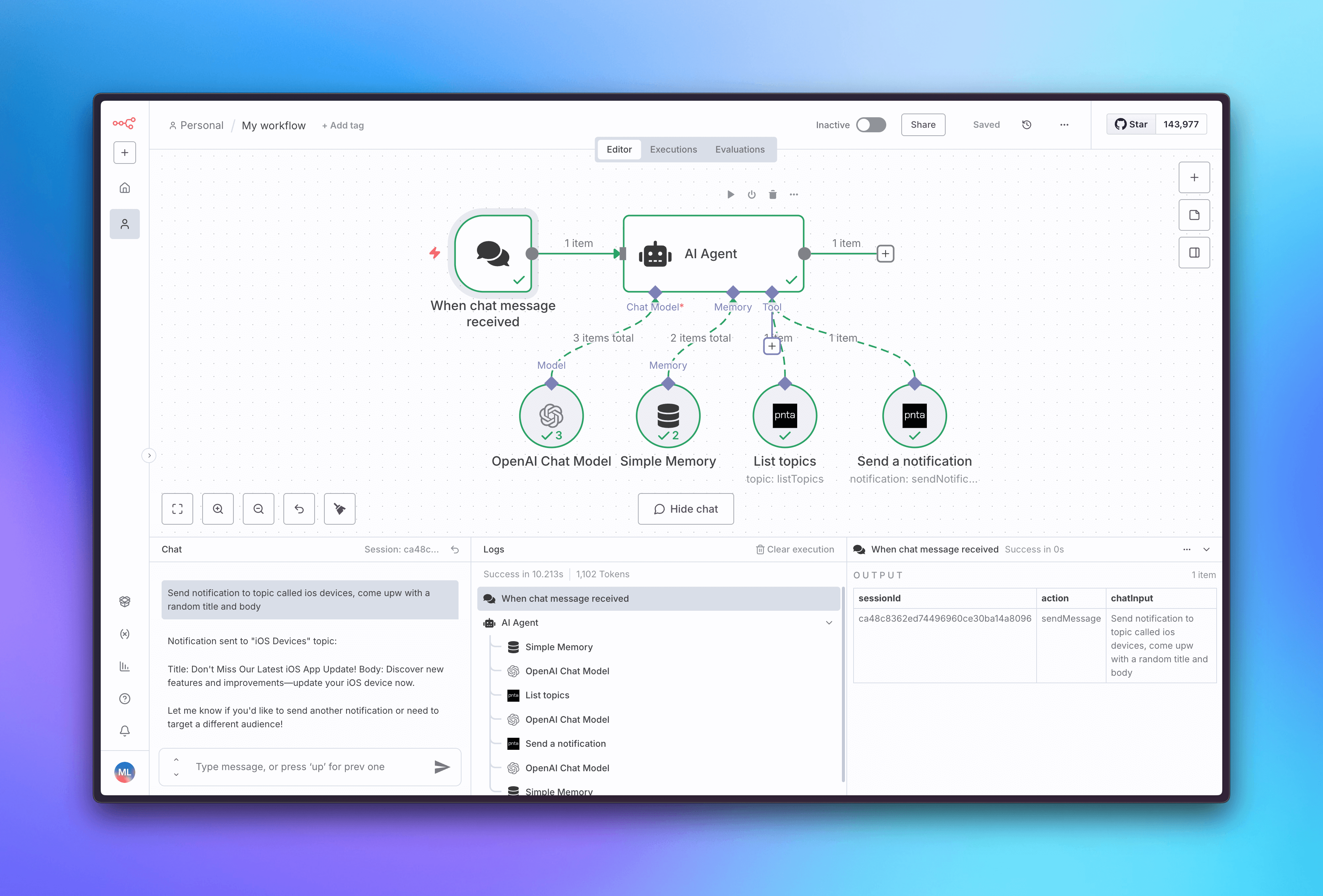
**Agent Workflows:**
* Use PNTA nodes within AI agent workflows
* Send notifications based on AI analysis or decision-making
* Create intelligent notification systems that respond to data patterns
### 3. Create Your First Workflow
Now you're ready to create powerful workflows with PNTA! You can use PNTA nodes in various ways:
**Webhook-Triggered Notifications:**
* Create a workflow that starts with a **Webhook** node
* Add a **PNTA** node to send push notifications when the webhook is triggered
* Perfect for real-time notifications from external systems
**Agent Workflows:**
* Use PNTA nodes within AI agent workflows
* Send notifications based on AI analysis or decision-making
* Create intelligent notification systems that respond to data patterns
 **Scheduled Notifications:**
* Combine **Cron** or **Schedule Trigger** nodes with PNTA nodes
* Send regular updates, reminders, or status notifications
* Automate recurring communication with your users
**Conditional Notifications:**
* Use **IF** nodes to create smart notification logic
* Send different messages based on user data, time, or other conditions
* Build sophisticated notification strategies
**Need help with self-hosted n8n?** If you need assistance setting up a
self-hosted n8n instance, we're here to help! Just reach out to
[support@pnta.io](mailto:support@pnta.io) and we'll get you sorted with your
own n8n deployment.
## Resources
Official PNTA node for n8n workflows
Learn more about PNTA integration with n8n
**Scheduled Notifications:**
* Combine **Cron** or **Schedule Trigger** nodes with PNTA nodes
* Send regular updates, reminders, or status notifications
* Automate recurring communication with your users
**Conditional Notifications:**
* Use **IF** nodes to create smart notification logic
* Send different messages based on user data, time, or other conditions
* Build sophisticated notification strategies
**Need help with self-hosted n8n?** If you need assistance setting up a
self-hosted n8n instance, we're here to help! Just reach out to
[support@pnta.io](mailto:support@pnta.io) and we'll get you sorted with your
own n8n deployment.
## Resources
Official PNTA node for n8n workflows
Learn more about PNTA integration with n8n