> ## Documentation Index
> Fetch the complete documentation index at: https://docs.pnta.io/llms.txt
> Use this file to discover all available pages before exploring further.
# FlutterFlow
> Set up push notifications in your FlutterFlow project using PNTA
## Prerequisites
* FlutterFlow account and project
* PNTA account with project ID (`prj_XXXXXXXXX`)
* For Android: Firebase project
* For iOS: Apple Developer account
* Platform keys configured in [PNTA Dashboard](https://app.pnta.io) (see [Platform Keys Setup](/resources/platform-keys))
## Setup Steps
### 1. Firebase Configuration (Android Only)
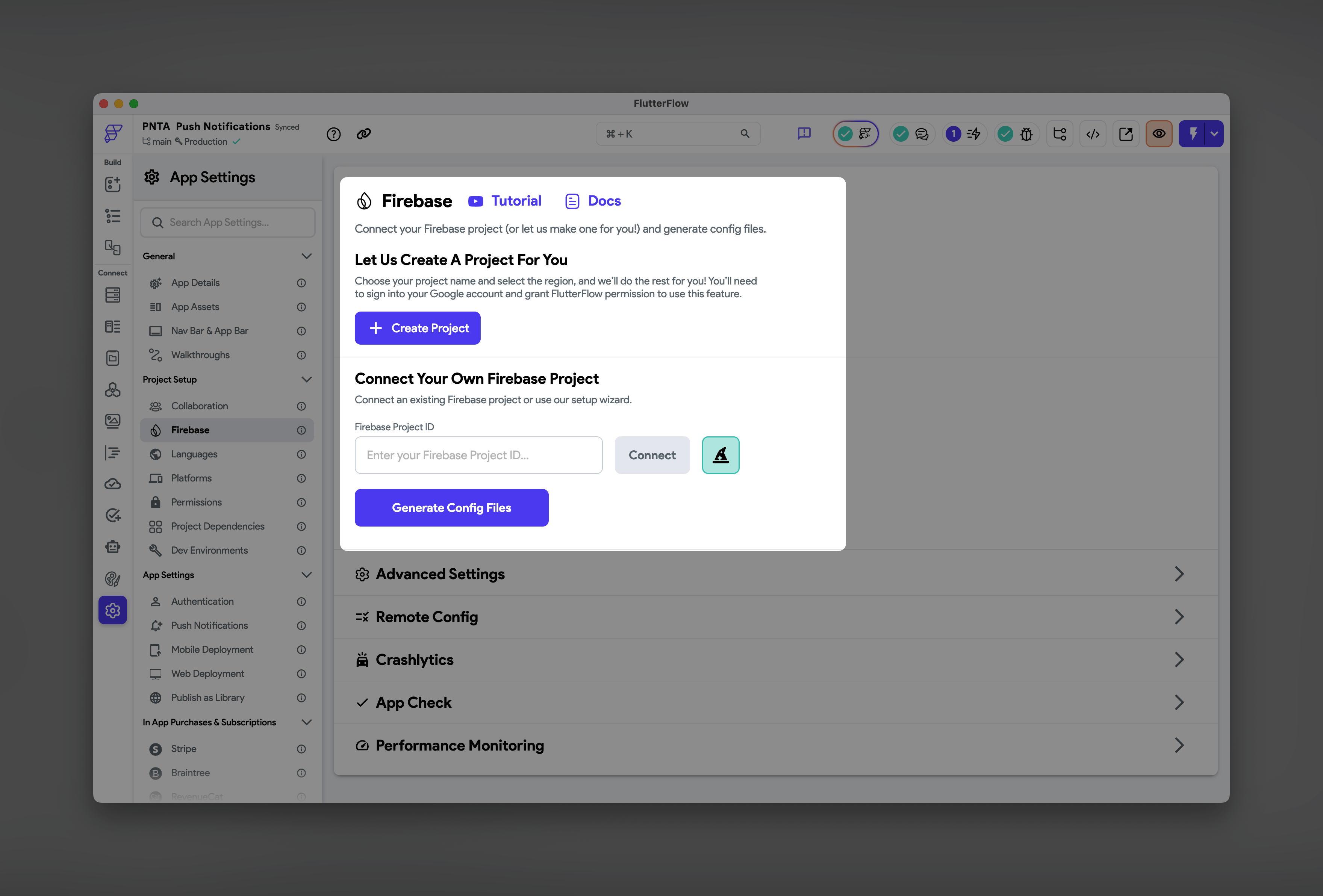
In FlutterFlow, set up Firebase for Android (FlutterFlow handles all the configuration automatically):
1. Go to **Settings** → **Firebase**
2. Either create a new Firebase project or connect an existing one
3. Click **Generate Config Files**
4. FlutterFlow will handle the `google-services.json` setup automatically
**Do NOT enable FlutterFlow's built-in push notifications.** This setting
adds FlutterFlow's own implementation that only uses FCM and requires
Firebase Auth. PNTA works fully independent of this and is compatible with
any auth or database you decide to use.
 ### 2. Add PNTA Dependency
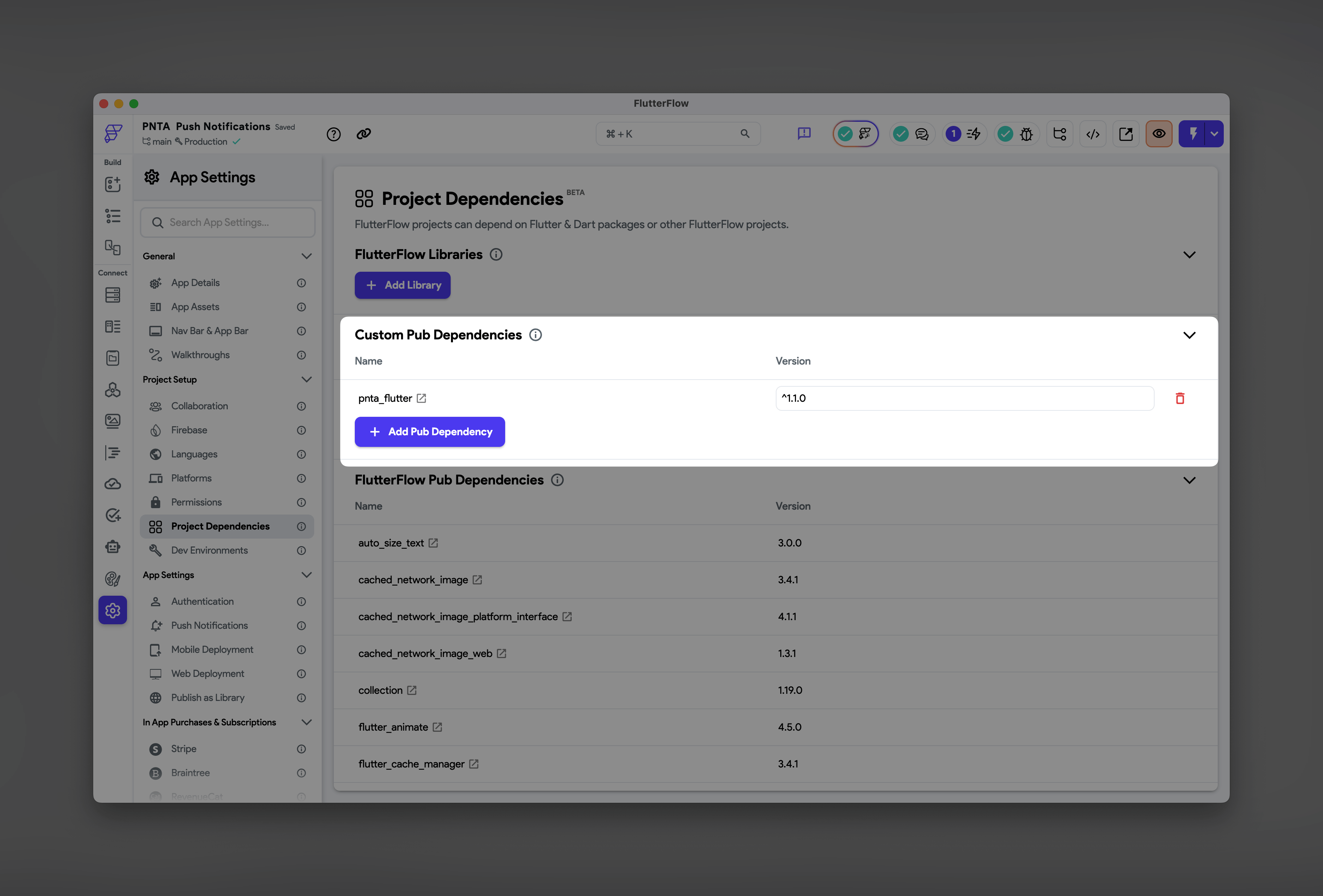
1. Go to **Settings** → **Project Dependencies**
2. Click **Add Pub Dependency**
3. Visit [pub.dev/packages/pnta\_flutter](https://pub.dev/packages/pnta_flutter)
4. Copy the latest version and paste it into FlutterFlow
### 2. Add PNTA Dependency
1. Go to **Settings** → **Project Dependencies**
2. Click **Add Pub Dependency**
3. Visit [pub.dev/packages/pnta\_flutter](https://pub.dev/packages/pnta_flutter)
4. Copy the latest version and paste it into FlutterFlow
 ### 3. iOS Configuration
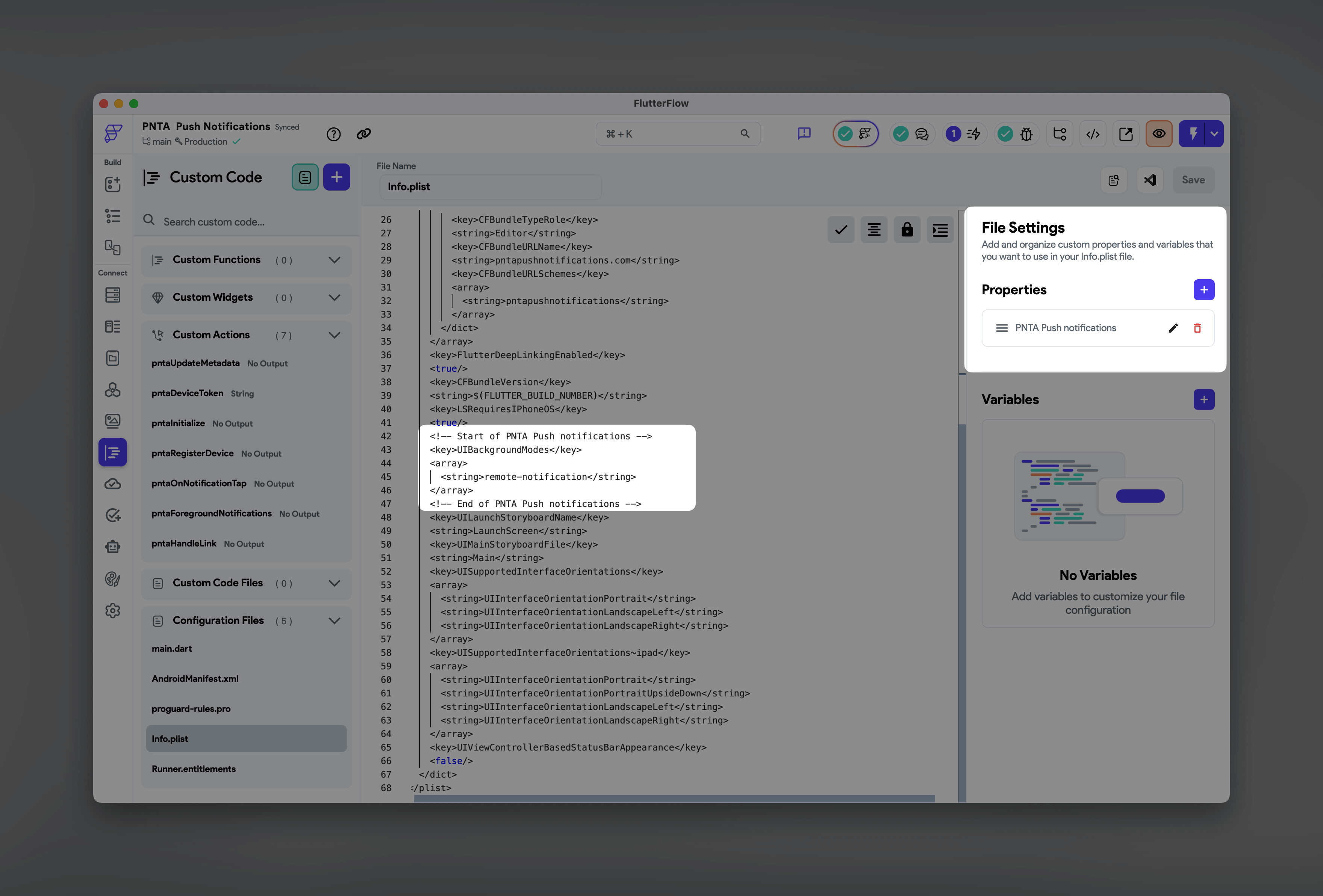
Go to **Custom Code** → **Configuration Files** and edit these files to add capabilities normally enabled in Xcode:
**Properties → `Info.plist`:**
```xml theme={null}
UIBackgroundModes
remote-notification
```
### 3. iOS Configuration
Go to **Custom Code** → **Configuration Files** and edit these files to add capabilities normally enabled in Xcode:
**Properties → `Info.plist`:**
```xml theme={null}
UIBackgroundModes
remote-notification
```
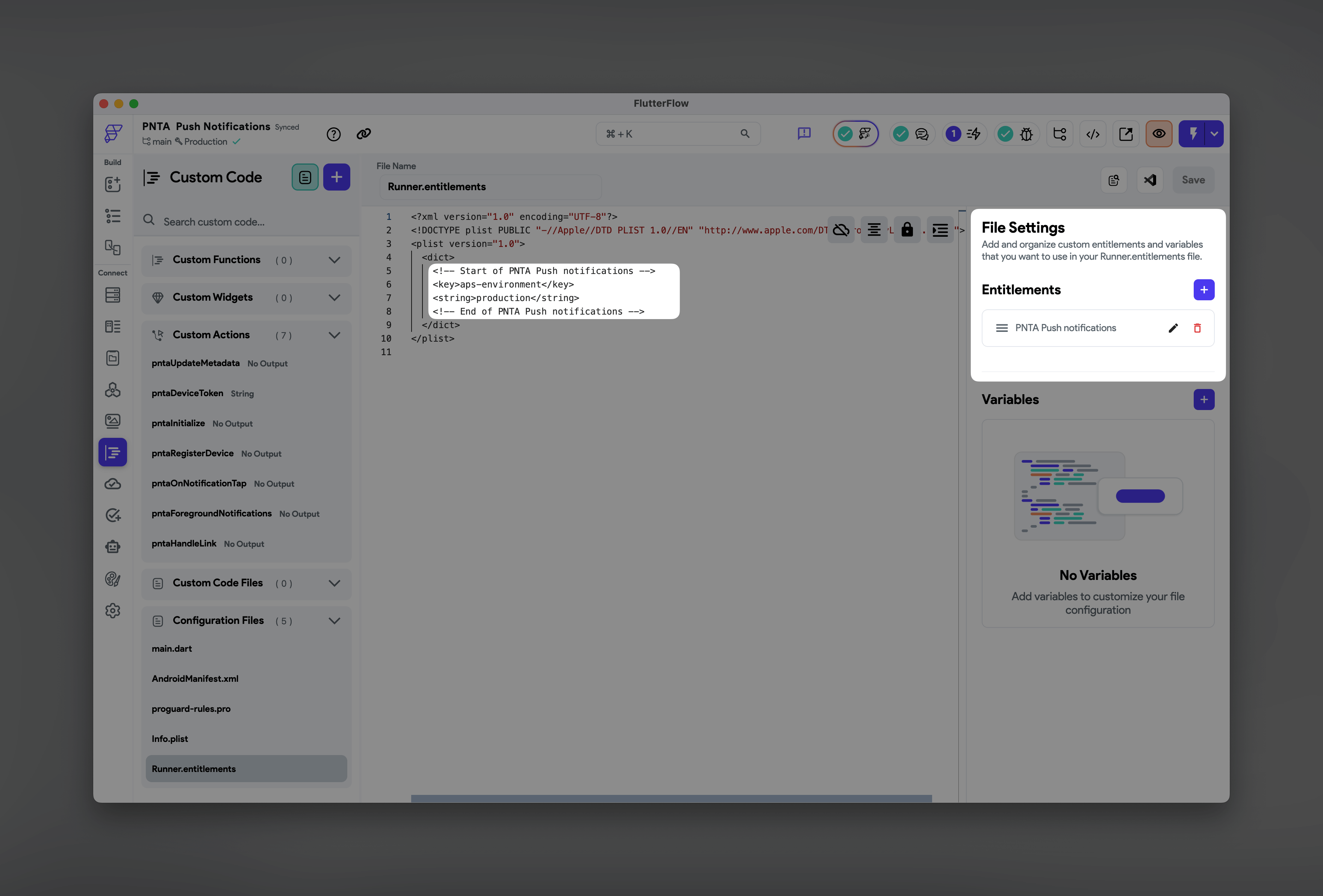
 **Entitlements → `Runner.entitlements`:**
```xml theme={null}
aps-environment
production
```
**Entitlements → `Runner.entitlements`:**
```xml theme={null}
aps-environment
production
```
 ### 4. Custom Actions
Create custom actions in **Custom Code** → **Actions** for PNTA integration.
Copy the required custom actions from our [FlutterFlow example project](https://marketplace.flutterflow.io/item/eD9VoY6IvHuucFq4iN9z) into your project.
### 4. Custom Actions
Create custom actions in **Custom Code** → **Actions** for PNTA integration.
Copy the required custom actions from our [FlutterFlow example project](https://marketplace.flutterflow.io/item/eD9VoY6IvHuucFq4iN9z) into your project.
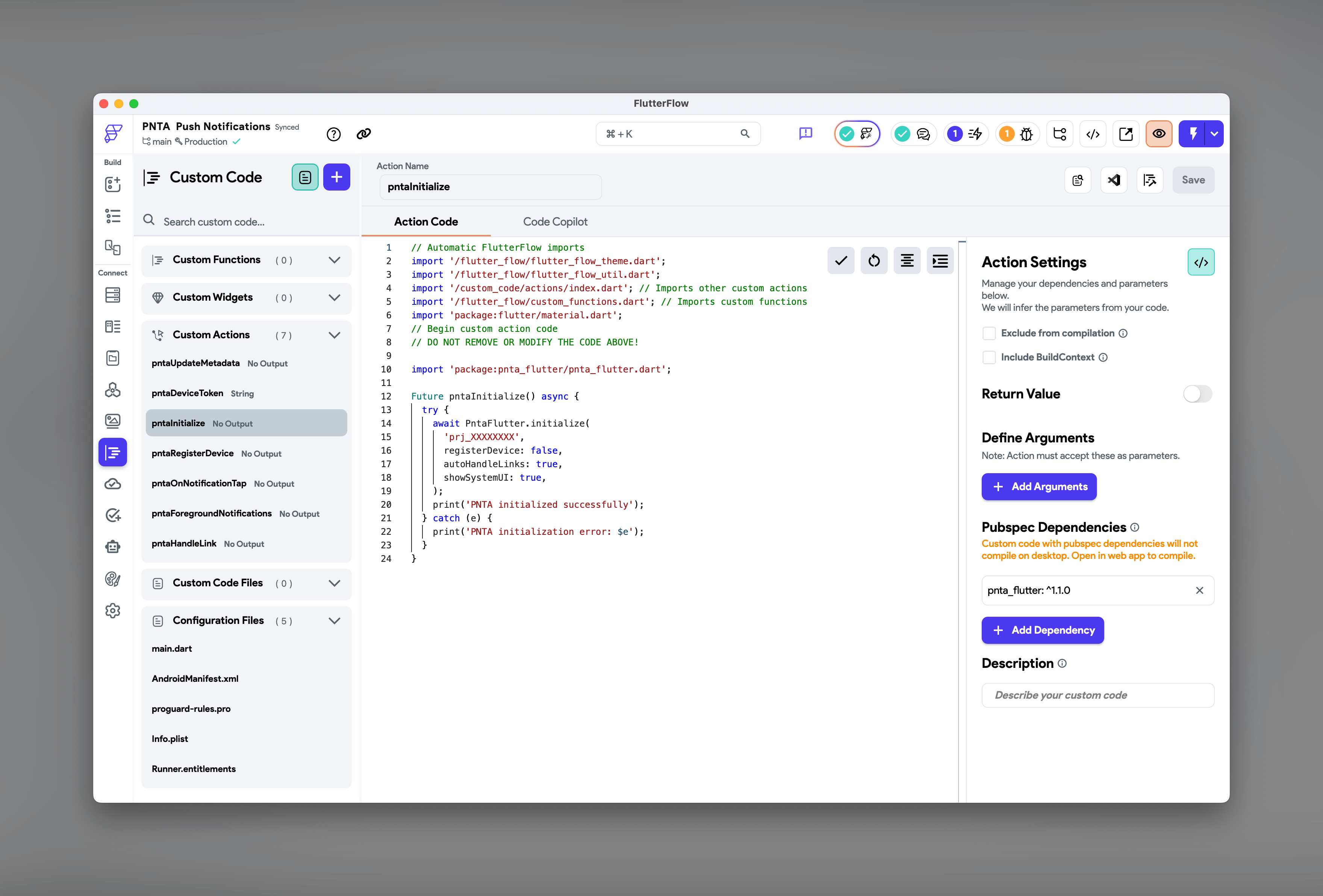 ### 5. Wire Up Your App
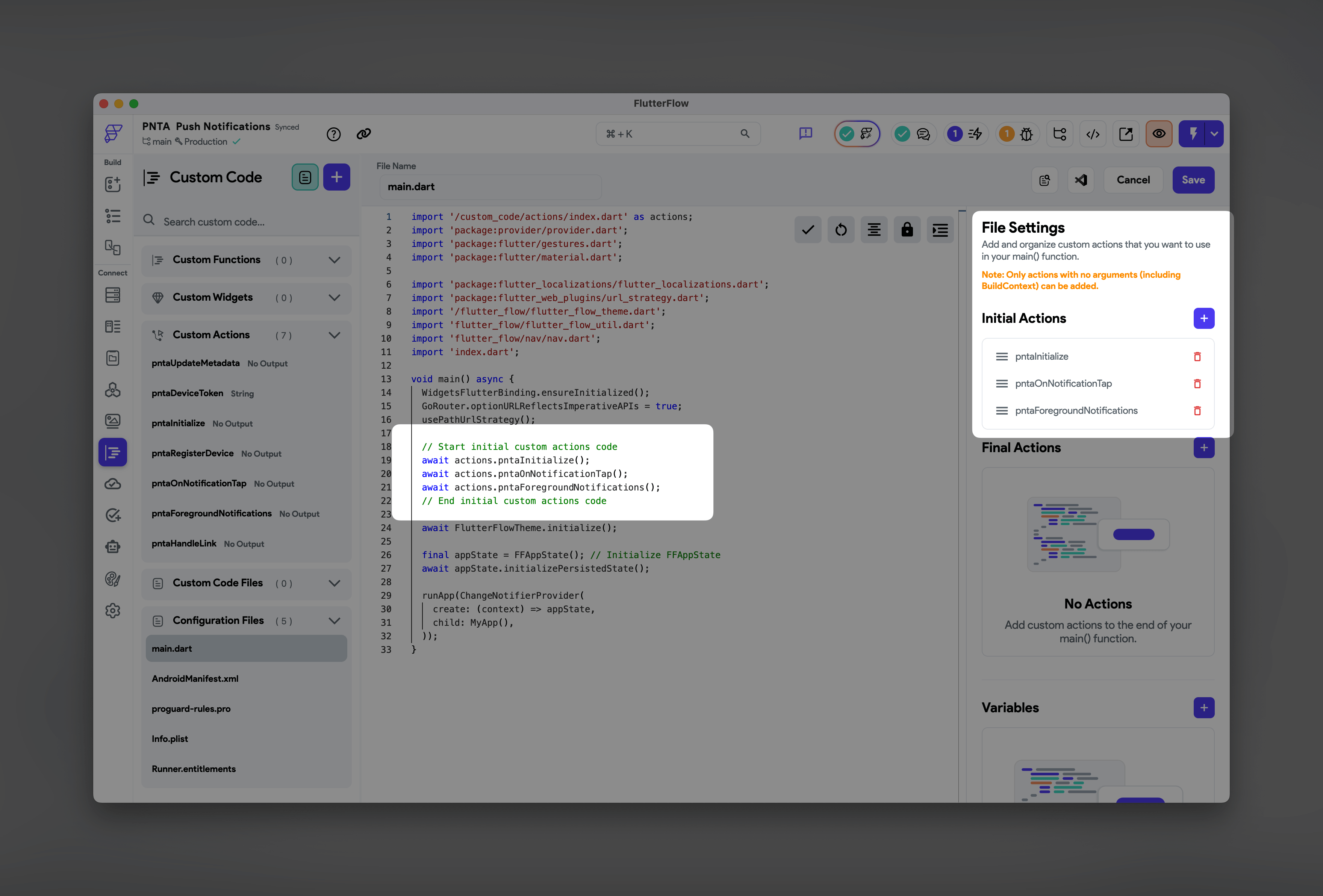
Add these custom actions to your app's **Initial Actions** in FlutterFlow.
**Required:**
**`pntaInitialize`**\
Initialize PNTA with your project ID and optional settings (defaults do not need to be declared):
* `projectId` - your PNTA project ID (required)
* `registerDevice` - set false if you want to use prompt registration in a specific flow in your app (default: true)
* `autoHandleLinks` - true to automatically open URLs, requires pntaOnNotificationTap to be set up (default: false)
* `showSystemUI` - true to show iOS notification banners and Android notification tray/sounds in the **foreground** (default: false)
**Optional:**
**`pntaOnNotificationTap`**\
Handle when users tap notifications from background or closed app. Required if using automatic link handling.
**`pntaForegroundNotifications`**\
Listen for notifications when your app is active. Sends notification data to FlutterFlow app state for custom in-app messages.
### 5. Wire Up Your App
Add these custom actions to your app's **Initial Actions** in FlutterFlow.
**Required:**
**`pntaInitialize`**\
Initialize PNTA with your project ID and optional settings (defaults do not need to be declared):
* `projectId` - your PNTA project ID (required)
* `registerDevice` - set false if you want to use prompt registration in a specific flow in your app (default: true)
* `autoHandleLinks` - true to automatically open URLs, requires pntaOnNotificationTap to be set up (default: false)
* `showSystemUI` - true to show iOS notification banners and Android notification tray/sounds in the **foreground** (default: false)
**Optional:**
**`pntaOnNotificationTap`**\
Handle when users tap notifications from background or closed app. Required if using automatic link handling.
**`pntaForegroundNotifications`**\
Listen for notifications when your app is active. Sends notification data to FlutterFlow app state for custom in-app messages.
 ### 6. Additional Methods
These methods can be used anywhere in your app on specific pages:
**`pntaRegisterDevice`**\
Use for delayed registration anywhere in the UI.
**`pntaDeviceToken`**\
Device token getter if you want to store it.
**`pntaUpdateMetadata`**\
Update device metadata in PNTA.
**`pntaHandleLink`**\
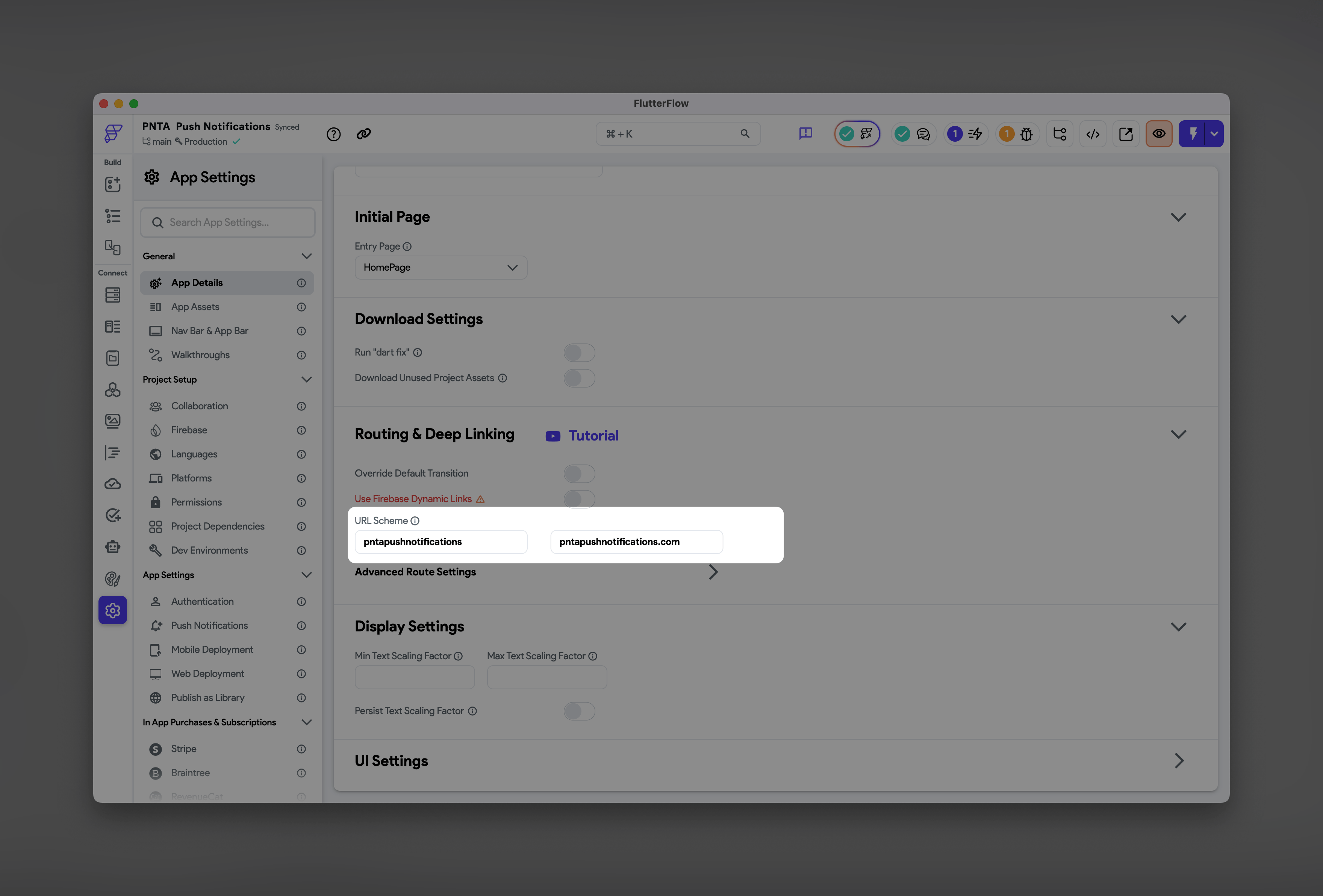
Opens link passed in the notification payload. You can also use FlutterFlow's default "Launch URL" action which does pretty much the same. For routing within your app using notifications, use the URL scheme provided in **Settings** → **App Details** (e.g., `myapp://myapp.com/profile`).
### 6. Additional Methods
These methods can be used anywhere in your app on specific pages:
**`pntaRegisterDevice`**\
Use for delayed registration anywhere in the UI.
**`pntaDeviceToken`**\
Device token getter if you want to store it.
**`pntaUpdateMetadata`**\
Update device metadata in PNTA.
**`pntaHandleLink`**\
Opens link passed in the notification payload. You can also use FlutterFlow's default "Launch URL" action which does pretty much the same. For routing within your app using notifications, use the URL scheme provided in **Settings** → **App Details** (e.g., `myapp://myapp.com/profile`).
 Check out the example project for these additional custom actions and see
how they're implemented in FlutterFlow's action builder. Test different
initialize settings to find what works best for your app's user experience.
## Resources
View package details and documentation on pub.dev
Complete FlutterFlow project with PNTA integration
Check out the example project for these additional custom actions and see
how they're implemented in FlutterFlow's action builder. Test different
initialize settings to find what works best for your app's user experience.
## Resources
View package details and documentation on pub.dev
Complete FlutterFlow project with PNTA integration